Git: Why did I need it when I'm an electrical engineer?
Published · 11 min read
On this page
Translated with machine assistance. Refer to the original for technical wording. Also available in
I am an electrical engineer. It wasn’t clear to me at first why I needed a tool that programmers talk about all the time. I was writing in Word, saving my files, and using OneDrive. The usual solution to keeping an old copy is to copy the file and add to its name today’s date, or the word “old”, “new”, or “final” for the third time.
So what’s the problem? Why should I add a tool to my work that takes time to learn?
Between 2016 and 2019 I was more inclined towards open source software. There was something about the desire for freedom, and something else that was no less important: I liked to make tools that would help me later. I didn’t want each project to end at a research paper and then start the next project from scratch. I wanted it to leave something I could build on: an understandable code, a method of calculation, or a set of results that I knew how I arrived at.
This is where I started to understand why I might need Git.
The problem is not that there is an old version
Having an old version is useful, but there are questions that the file name alone does not answer.
Which version of the simulation model produced this curve? What value did you change before the result improved? Did you actually modify the calculation method, or fix an error reading the data? And what did I send to my colleague last week?
Imagine a simple project with a calculation program, a transaction file, results, and a draft article. You might modify parameters and code on the same day, and then forget to update the table within the article. Every file exists, yet the relationship between the files is lost.
This is the difference that matters to me: I want to preserve the state of the project and the meaning of the change, not a collection of copies that are difficult to distinguish between.
A version control system records file changes over time, and allows for state comparison and reversion to a previous version. Git is one of these systems; It can be used in an individual project, or it can be used in group work. 1
Where did Git come from?
Git began in 2005 in the context of Linux kernel development, after the end of the arrangement that allowed developers to use BitKeeper for free. Linus Torvalds was one of the key figures behind the development of the variant, and the requirements were practical: speed, distributed work, and dealing with a large project whose development could branch out in many directions. 2
I like knowing this beginning because it explains what the tool looks like. Git is designed to handle a lot of changes, made by different people, that then need to be understood, combined, and reviewed. Your project does not have to be Linux-sized to benefit from the same idea.
Git and GitHub: two names I use, but each has a function
Git is a version management system that runs on your machine. You can record changes, view history, create branches, and compare files without uploading the project to any location.
GitHub is a service that can host a Git repository and add tools for review, collaboration, and automation. You can use Git without GitHub, and you can host your repository on another service or on a server you own. 12, 6
A repository, or repository, is a project with its record. In a typical local repository there is a hidden folder named .git that contains the data Git needs to manage this history. So I don’t treat it as a temporary folder that can be deleted to clean up the project. 4Visually, I might imagine history as a vertical timeline: a state, then a modification, then a new state. But Git also allows this line to branch; I try out an idea in a separate branch, then review it and decide whether to include it in the core business. 7
What do I save when I commit?
commit A recording of the status of selected tracked files, along with a message explaining the change and data such as author and date. It has a hash-based identifier, which we usually see as a string of letters and numbers.
Git treats a project’s history as snapshots of its state. If a file has not changed, it can return to previously saved content instead of creating a separate copy of it each time. The basic processes, including registering these cases, are carried out locally. 3
But Git does not automatically know that this modification “corrected an equation” or that it “changed the research hypothesis.” I am the one who writes this meaning.
There is a big difference between a message like:
update
And a message like:
Correct the line-to-line voltage conversion in the current calculation
In both cases there is a saved copy. In the second there is also a sentence that helps me understand months later what happened.
The smaller and interconnected the changes, the better able history is to help me. Modifying the calculation method, renaming dozens of files, and fixing the format of the tables in a single recording makes reviewing more difficult, even if everything is saved.
How does this enter into the work of an electrical engineer?
Suppose I compare the response of two controllers in a simulation. The following example illustrates the idea, but does not describe a specific experience:
| Action phase What do I record? | Why is it useful to me later? | |
|---|---|---|
| Install Reference Case | The code, model parameters, and how to operate it I know the starting point to which I compared | |
| Modify the controller | The specific modification and its reason | I distinguish the effect of the controller from the rest of the changes |
| Correction of arithmetic error Debugging is separate from idea development Know which results need to be recalculated | ||
| Preparing the article | Source of tables, figures and text | I can link the speech to the version that produced the results |
This doesn’t mean I put every large file inside Git. Some simulation files and binary data do not give an understandable text comparison, and may need separate storage or tools like Git LFS. What is important is that there is a clear organization that links the data to the code and settings necessary to use it. 8
This does not mean that history alone makes research reproducible. If I save the program and do not record the dependencies, the random seed when it is effective, or the necessary data, I may keep the copy and be unable to replay it. This is the responsibility of the project organization; Git helps me save and review this organization.
Ok, what do I do every day?
I summarize the idea in my mind to: I change, then record, then upload. But between changing and recording there is a step that I want to remain clear: I review what I will save.
In an existing warehouse, a simple duty cycle could be like this:
git status
git diff
git add simulation.py notes.md
git diff --staged
git commit -m "Document the assumptions used in the reference case"
git push
status Displays the status of files. The diff helps me review textual changes. add determines what goes into the next recording, and commit then saves this state locally. Finally, push sends the recordings to the remote repository configured for this project. Commit does not upload the work on its own, and push does not automatically record every modification that I did not save in commit. 5, 6
I am not required to type these commands manually all the time. I could implement the same idea from the editor interface. The important thing is that I understand what is happening, so that I do not press buttons that I do not know the difference between.
When I return to the project after a break, I can start with a brief history:
git log --oneline -8
Eight good letters may be more useful than opening eight folders with similar names. 9
Was it easy for me to learn?
No. It was difficult at first, and part of the difficulty was that I wasn’t completely convinced I needed it.
I was still using Word, and the difference between two files .docx was not as clear to me as the difference between two text files. Git saves Word files, but they don’t typically expose live text spreads like Markdown or LaTeX. There are conversion filters to help with comparison, which require additional setup. This made Git’s usefulness less obvious in part of my work at the time. 13
Then I moved closer to Markdown and LaTeX, and the code, notes, and article now live in the same place, and I open them from the same editor. I can’t say for sure which of these tools led me to the other first, but their combination changed the experience.
Git is no longer an administrative task at the end of the day. It has become part of the way I work.
This is exactly what I look for in tools: to get to work when they help me, not to stop working all together to prove that I’ve mastered them.
What has artificial intelligence changed?
With code generation tools, it’s easy to make a big change in a short time. You may request a small change, only to find new files and modifications in places you did not expect.
To me, this increases the need for a record that can be reviewed. Before the modification there is a situation that I know, and after it there are differences that I can read and test. The speed of writing code does not exempt me from understanding its impact.
There is clear growth in activity on GitHub, but we must define what we are measuring. The Octoverse 2025 report stated 630 million repositories in total. The following graphic shows another metric: the number of push operations, according to the numbers recalculated in the 2026 report. 10, 11
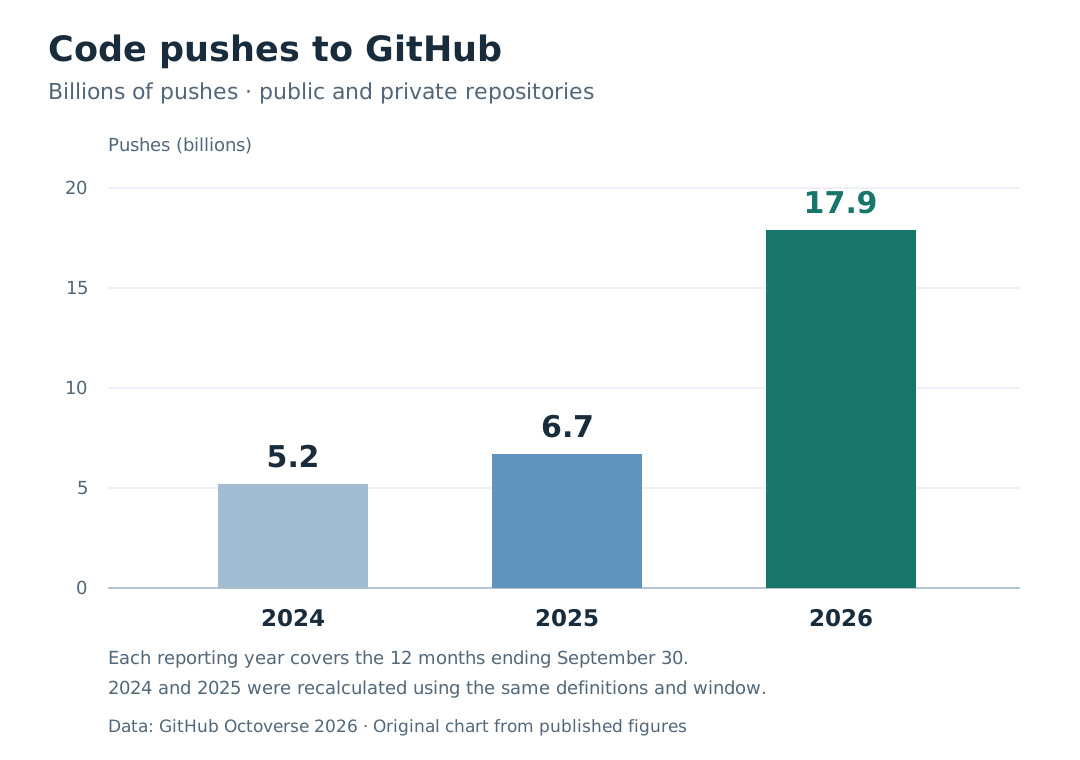
What matters to me in day-to-day use is simpler than these numbers: if changes become faster, it’s useful to still be able to track and review them.
What am I not asking from Git?
I do not ask it to remember what I have not recorded. Modifications in working files do not become part of history just because a repository exists.
Don’t confuse history with backup. A repository that only exists on one disk is vulnerable to losing that disk, and uploading recordings does not upload excluded files or data I keep outside of it. 3, 6
Also Git doesn’t keep me organized once I install it. I can put a big mess in it, and store it very carefully. Organization comes from how I divide work, clarity of file names, changes messages, and what I decide to record.
But the presence of the tool makes this organization viable.
Why is it so hard for me to work without it now?
Because I started looking at the project folder as a working unit with memory. It contains the idea, the code, the notes, and what changes from one attempt to the next.
The work I’ve done doesn’t guarantee that the next idea will be good, but it doesn’t need to be wasted for me to start it. I can go back to an old calculation, pick up part of a project, or understand why I left a certain path.
I was initially asking: Do I even need Git? Now, the question I ask before an important modification is: Have I registered the state I want to be able to return to?
This is usually a small change, but it’s a big difference in my relationship with what I’m working on.
Sources and further reading
- Pro Git — About Version Control. Version control definition.
- Pro Git — A Short History of Git. The origins of Git and the context of its development.
- Pro Git — What Is Git? Snapshots, content IDs, and local work.
- Pro Git — Getting a Git Repository. Repository and .git folder.
- Pro Git — Recording Changes to the Repository. File status, staging area, and commit.
- Pro Git — Working with Remotes. Remote repositories, submits and fetches.
- Pro Git — Branches in a Nutshell. Branches idea.
- GitHub Docs — About Git Large File Storage. Storing large files with Git LFS.
- Git — git-log. View change log and options.
- GitHub Octoverse 2025. Number of repositories and platform growth.
- GitHub Octoverse 2026. Activity numbers and comparison methodology.
- GitHub Docs — About Git. The difference between Git and GitHub and their role in collaboration.
- Pro Git — Git Attributes. Compare using transformation filters, including example files Word.
Sources last revised: November 3, 2026.