Word and LaTeX: What's changed in the way I write?
Published · 12 min read
On this page
Translated with machine assistance. Refer to the original for technical wording. Also available in
“Okay, did Word fall short with you in what?”
This is a question worth asking before I suggest anyone learn LaTeX. You have a program you know, in which you write, format the pages, and send the file to someone who will review it. Why add a command language, packages, and a new step called document compilation?
For me, the answer didn’t become clear the first time.
At first I saw LaTeX as another way to write the same paper. I download the tools, open TeXstudio, type a script, and then wait for the PDF to build. I had a program that looked like Docs, but it took more steps before I could see the page.
After that, my relationship with it changed, when the place in which I placed writing within my work changed.
What is LaTeX even?
LaTeX is a document preparation and description system. I write source text that describes the content and its structure, which TeX tools then process to produce the final document, often a PDF. It is not the name of the editing program I write in; I could edit the source in TeXstudio, VS Code, etc., and use the appropriate engine to compile it. 1, 2
The idea I like about it is that I’m telling the document: This is a section title, this is an equation, and this is a reference to a shape. I don’t need to re-decide the size of the title or the location of the equation number every time.
For example:
\section{Results}
This sentence means that there is a section titled Results. The shape of the title, its numbering, and the spaces around it are controlled by the document category and its settings.
This is a useful separation between structure of speech and how it is presented. But it doesn’t mean that LaTeX understands the scientific meaning of what I write, nor that it makes the content correct once the page looks organized.
What is the difference between the two methods?
Word is often described as working in a WYSIWYG: What You See Is What You Get format; Edit the document in a view close to its final form.
When writing a LaTeX source, I write the text and its structure instructions, and then see the output after compiling. The editor may display the source and PDF side by side, but the file I’m editing is still a text source. 1, 2
However, the comparison is not between an instrument with structure and one without structure. Word has styles for headings, references, and labels for figures and tables. If you use it well, you’re also telling him: This is a title, this is a form, and this is a reference to it. 4, 5, 6
The difference I want to explain is the day-to-day approach to this structure, and how it fits into the rest of the work.
Is Word incapable of mathematics or long documents?
No. This is an unfair formulation, even if my personal experience has led me to prefer LaTeX.
Word supports equations, and LaTeX linear input can be used within the equation editor. Titles, references, and format labels are supported. So just having an equation or having a lot of pages is not enough to say that the document should be moved to LaTeX. Entering the LaTeX form of the equation into Word, by the way, does not mean that it compiles a complete .tex project. 3, 4, 5, 6
Also, writing a short application in LaTeX doesn’t make me any more professional than writing it in Word. Word may be faster and more appropriate for this task, especially if whoever receives the file needs to edit it in the same way.What attracted me to LaTeX was a combination of other things: lots of equations, references that change, results that come from code, and a history of the project that I want to review using Git.
Why didn’t it work for me from the beginning?
I did not initially learn it in the appropriate way for my job.
I focused on installing the engine, opening the editor, and outputting the PDF. These are necessary steps in local work, but they were not the problem I originally wanted to solve.
I also had a reality that I couldn’t ignore: my supervisor during my master’s needed to read, review and edit the thesis. Writing is not a completely solitary process, even if I am the one sitting in front of the file most of the time.
If I became able to coordinate better, but it became more difficult for those who work with me to exchange modifications, there is a real cost that I must calculate. Word has tools for tracking, accepting, and rejecting edits, which is an important part of the experience for many reviewers. 7I don’t want to choose a tool based on what it can do alone, and then discover that it doesn’t work for the people sharing the document with me.
When did its use become normal?
As I learned more about Git, I started opening article files with the same editor I use for code, such as Sublime or VS Code.
The text is now next to the accounts, and the tables are next to their source. I no longer move mentally from the “research project” to the “separate writing portfolio” to the same degree.
file.texPlain text, so Git can display its line differences directly. I review a paragraph I changed, an equation I added, or a heading I deleted. This is clearer to me than keeping several files with names old, new, and today’s date. I explained the idea of saving project state in Git article. 2, 8But plain text is not magic. If you reformat all the lines unnecessarily, the comparison may become cluttered. If two people edit the same paragraph, I may need to resolve a conflict. The benefit also comes from the organization of the work, not from the file extension alone.
Git can also save Word files, and there are ways to compare their content. What I mean is that the source text aligns directly with the code review method I use. 8
Small example: Let the calculation write the table
This is one of the ideas that made LaTeX useful to me: instead of calculating the results in place, and then manually rewriting them in the article, I can generate a table from the program itself.
Let’s take a simple educational example, not the results of a research experiment. We calculate current using Ohm’s law in two separate cases: we connect a 10 ohm resistor to a 12 volt DC source, then we repeat the calculation for a 20 ohm resistor at the same voltage.
This is a Python program that can be saved asmake_table.py:
from pathlib import Path

voltage = 12.0
rows = [
    r"\begin{tabular}{rr}",
    r"$R\;(\Omega)$ & $I\;(\mathrm{A})$ \\",
    r"\hline",
]
for resistance in (10, 20):
    current = voltage / resistance
    rows.append(f"{resistance} & {current:.2f}" + r" \\")
rows.append(r"\end{tabular}")

Path("results").mkdir(exist_ok=True)
Path("results/table.tex").write_text("\n".join(rows), encoding="utf-8")
Then have the article filemain.texthus:
\documentclass{article}
\usepackage{amsmath}

\begin{document}
\section{A simple DC example}

For an ideal resistor connected to a DC voltage source,
\begin{equation}
I = \frac{V}{R}.
\label{eq:ohm}
\end{equation}

The table uses Equation~\eqref{eq:ohm} with $V=12\,\mathrm{V}$.

\begin{table}[ht]
\centering
\input{results/table.tex}
\caption{Illustrative calculated currents.}
\end{table}
\end{document}
The command\inputInserts another file’s content when compiling the document. In this example the table comes from the calculation, instead of me writing the values again. 9To test locally, after installing Python and the TeX distribution that provides pdfLaTeX and the amsmath package:
python make_table.py
pdflatex main.tex
pdflatex main.tex
The second pass solves the assignment to the equation number in this example. The currents are shown as 1.20 A and 0.60 A. If I change the calculations, I restart the program and then build the PDF.I intentionally kept the example small, because the idea is more important than the length of the code. In a real project the program could generate a comparison table or drawing file, and the article could then use it directly. But I must recalculate and regroup, and review the result; LaTeX alone does not know that the source data has changed.
This also does not prevent automation of Word documents. It’s just a clear example of the way I’ve integrated writing into my work environment.
What about Arabic?
LaTeX is not limited to English. Arabic and mixed text can be set up using an engine such as XeLaTeX or LuaLaTeX, with appropriate font and language packages, such as fontspec and polyglossia, and a font that supports Arabic. 10But setting the Arabic is part of choosing the template and engine; It’s not enough for me to put Arabic text inside any old example and assume that it will work in the same setting. If the document is Arabic, I start with a simple Arabic template that works, and then gradually add what I need.
This is another reason why starting with a small project is better for me than trying to convey a complete message on the first day.
The learning curve is not a competition
In Word I can quickly start writing and formatting live. Then I need to learn more tools as the document structure increases: styles, numbering, references, sections.
In LaTeX I encounter a bit of complexity early on: what is the source file? How do I build it? Why did an error message appear? What package does the template require? Once these basics are in place, iterating over a familiar template can become very comfortable.
This is an observation about the two courses of action, not a law that says one tool will overtake the other after a set number of days.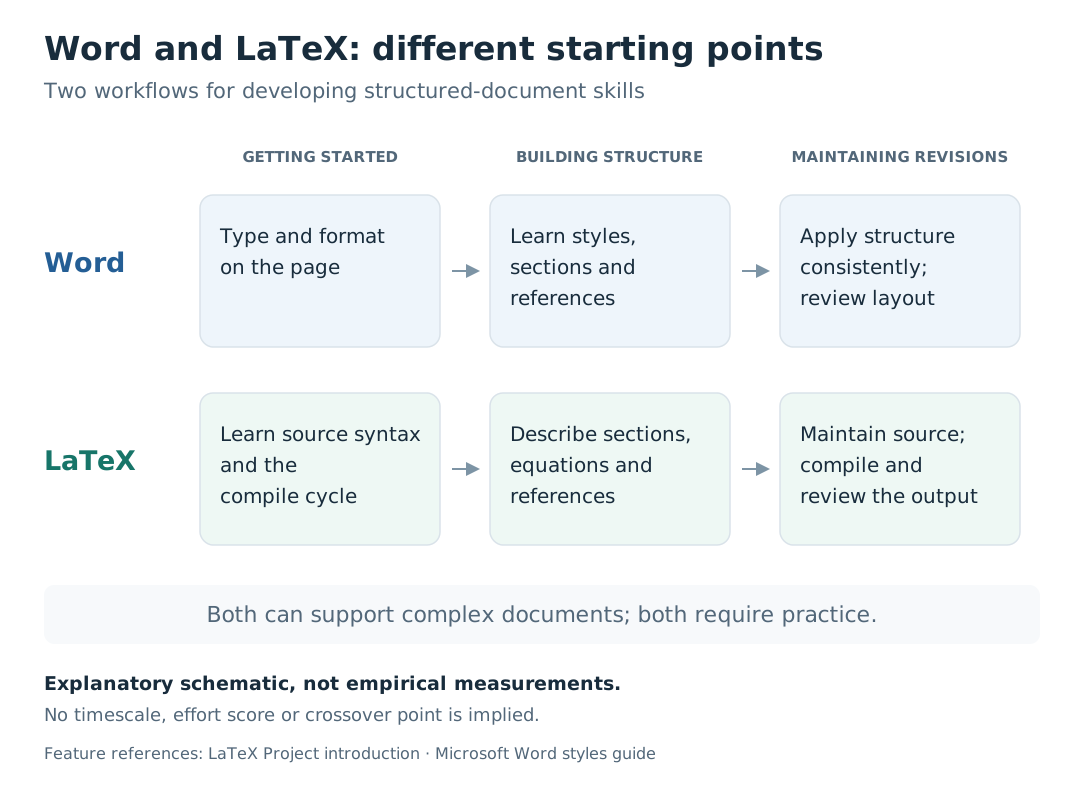
</figure>I don’t need to memorize all the LaTeX commands. I need a template that I understand, a way to find the cause of the error, and the ability to add something that serves the current document. Too much package is not a sign of the quality of the article; It might just mean I made it harder to maintain.
So, when do I choose each tool?
I can structure the decision this way, with the team’s experience and the recipient’s requirements still part of it:
| Position | What do I tend to choose? | Practical reason |
|---|---|---|
| A short letter or document that needs quick editing Word mostly | Fewer steps to write and share in an environment you are accustomed to | |
| Review with a team that tracks edits in Word | Word or a review method we agree upon | Ease of collaboration is part of quality workflow |
| Article related to code that generates results and frequent tables | LaTeX mostly | Source, results and date can be organized together |
| A document containing many equations and references, and I have a suitable template | I lean towards LaTeX | I make use of the structure and template I know |
| A magazine requests a specific template or format What the magazine asks | Read the publishing instructions before building the document | |
| A task the team can accomplish well with its current tool I don’t change the tool just for the sake of change Transition time also has valueThese are workflow preferences, not a list of what each program can or cannot do. |
“How do I convert Word to LaTeX?”
A colleague asked me this question when he needed to submit his article to a journal in LaTeX format.
The question is understandable; He has a completed file, and the receiving party wants another format. But for me it sums up a broader problem with the way we look at the tool: we sometimes see it as a final gate to pass before publication.
Conversion tools can help, but ultimately converting a document doesn’t retrospectively give me the benefit of linking text to accounts, organizing references from the beginning, or reviewing its changes as I work. After conversion, I may need to adjust the equations, tables, and references according to the template.
The idea I want from LaTeX starts before this stage.
I don’t choose it just because the page looks more “scientific”, nor because Word is a less valuable tool. I use it when it makes writing a natural extension of what I’m already doing: I calculate, review, generate results, and then explain them.
When Word is better suited to the task, there is no battle to be won against it. The important thing is that the writing ends up in a correct, understandable document that can be worked on.
Sources and further reading
- The LaTeX Project — An introduction to LaTeX. The idea of the system and separating content from design.
- Overleaf — Learn LaTeX in 30 minutes. Source, compilation, and structure of the first document.
- Microsoft — Write an equation or formula. Equations and linear input formulas.
- Microsoft — Add a heading. Using heading styles.
- Microsoft — Add, format, or delete captions in Word. Labels of figures, tables, and equations.
- Microsoft — Create a cross-reference. In-document references.
- Microsoft — Accept or reject tracked changes in Word. Review edits.
- Pro Git — Git Attributes. Text file differences and Word file comparison filters.
- Overleaf — Management in a large project. Split the source and use input and include.
- Overleaf — Multilingual typesetting using polyglossia and fontspec. Engines, fonts, and multilingual writing.
Sources last revised: November 3, 2026.