Vim and piano: when you stop thinking about buttons
Published · 11 min read
On this page
Translated with machine assistance. Refer to the original for technical wording. Also available in
There is a similarity between learning Vim and learning to play the piano.
At the beginning of learning to play the piano, one thinks about the position of each key, which finger to press, and how to move to the next note. With practice, these movements become familiar, and he can direct his attention more to the melody he wants to play.
This is the thing that attracted me to Vim. I wasn’t looking for a way to get me to press the most buttons per minute. I was trying to reduce the distance between the idea and its writing and editing.
Here I mean normal typing on the keyboard, including moving within text, selecting a word, deleting a line, and modifying a sentence. I want to think about what I write, and for the movements necessary to write and edit it to become familiar, instead of stopping at each step to think about where to click or how to select this part with the mouse. I wanted writing on the computer to feel closer, in my feeling, to writing with a pen: for the tool to be familiar enough to not keep me busy all the time.
What is Vim in the first place?
Vim is a text editor, which stands for Vi IMproved. It is used to write programs and text files, and can be controlled from the keyboard, with support for the mouse as well. But the idea that distinguishes it is not that the mouse is forbidden; The idea is that the meaning of the key varies depending on the mode you are operating it in. 1
In many editors, if you press a letter, that letter is written, and if you want to do something else you add Ctrl or Alt to it, or go to a menu.
In Vim there are modes. In one mode you write text, and in another the letters become commands for movement and modification. It is as if the keyboard itself took on more than one function, without us adding new rows of buttons to it.
I imagined this like an airplane cockpit: many switches, each with a function known to the hand. The analogy helps, but Vim does something nicer than just multiplying keys; It allows small commands to be combined to express larger modifications.
Three modes to start with, not all of the existing modes
It is helpful to first understand these three modes:
| mode | What do I do in it? | Simple example |
|---|---|---|
| Normal | I move through the text and issue edit commands | Press w to jump to the beginning of the next word |
| Insert | Write the letters inside the file | Enter it by pressing i from normal |
| Visual | I select a piece of text and apply the | command to it Enter it by pressing v |
Pressing Esc takes me back from Insert or Visual to Normal. There are other modes, including command line mode, which I access by pressing :. So “Vim only has three modes” is an oversimplification; This is a good start to learning, not a complete description of the editor. 1
If you open Vim and then press characters and they don’t get written, you’re probably in Normal. This initially confusing moment is the same as the gist of the idea: the keyboard is waiting for you to command, not text.
Power in installing commands
I learned to look at Vim commands as short sentences.
There’s an action I want to perform, and there’s a piece of text I want to apply it to. For example: delete a word, change what is inside the parentheses, or copy the line.The character d initiates a Delete operation, and c initiates a Change operation followed by an Insert. iw refers to the word inside the cursor, and i( refers to the content inside the round brackets. When I put these pieces together it makes more sense. 2, 3
| What I want to do | The command is from Normal | How do I understand it? |
|---|---|---|
Moving between words w or b |
w to the beginning of the next word; and b to the beginning of the current or previous word depending on the position of the cursor |
|
| Delete the word I am standing inside | diw |
delete + inner word |
| Change the word I stand inside | ciw |
Delete its content and start typing the alternative |
| Change the content inside the parentheses | ci( |
change + inner parentheses |
| Delete the current line | dd |
A short command to handle the entire line |
| Repeat last change | . |
Perform the previous modification again |
| Undo Change | u |
undo |
It is important that I learn it within an example. If I have the line:
reference_voltage = calculate_voltage(old_parameter)
If the cursor is inside the parentheses, ci( allows me to change old_parameter, then I type the new parameter and press Esc. I don’t need to specify the number of letters, nor need to carefully drag my mouse between the brackets.
This is the part that attracted me: to describe what I want to modify instead of calculating every move necessary to reach it. The mouse can still be useful for other things; It doesn’t have to turn into a keyboard loyalty test.
What about h, j, k and l?
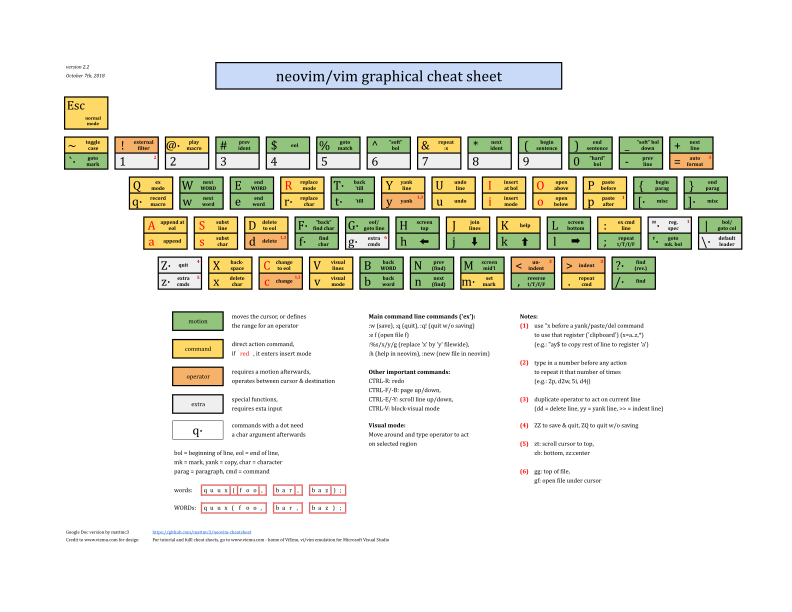
These keys move the cursor left, down, up, and right, respectively, in the usual setting. But it’s not all Vim, and memorizing it alone doesn’t explain its usefulness. Skipping a word, searching for text, or jumping to the end of a line may be more convenient than repeating the movement of a single letter dozens of times. 3
The following map is a reference that I can return to when needed, not a list I am required to memorize before I begin.
What changes when typing on the keyboard?
When I write in the usual way, I write letters, then move within the text to review and edit what I have written. I may use the mouse to select a word, or press the directional keys several times to reach a specific position. These movements are part of the writing itself, and are what I want to make smoother.With Vim I can express modification with a direct command: change this word, delete this line, or move to the next word. As commands become familiar, I need to think less about the steps to carry them out. So I can benefit from it even if my typing speed is normal. The benefit is also in the method of movement, modification, and choosing the appropriate process.
I also had a new meaning for the Esc key. I use it a lot, so moving its functionality to Caps Lock could be a convenient choice for those who are comfortable with it. But it is an optional customization, not a step every user must perform. It’s better to change what’s really bothering me after I understand my usage, not copy someone else’s entire keyboard.
When typing Arabic, pay attention to the keyboard layout: the examples here assume that the command keys send the Latin letters displayed. The way to switch between writing layout and commands depends on the editor and its settings.
Program is one thing, Vim motions are another thing
This is an important difference in my experience, because I didn’t start out using the same Vim program every day.
I started experimenting with his motions in Sublime Text, then used them in VS Code. There are tools that port this approach to editors, such as Vintage in Sublime and VSCodeVim in VS Code, although they don’t port all of Vim’s behavior in the same way. 4, 5
After that I used Neovim, and I still use it alongside VS Code. Neovim is an extension of Vim that focuses, among its goals, on extensibility, the Lua interface, and integration with other tools. 6
LazyVim is a ready-made setup of Neovim that combines settings and plugins, and uses the lazy.nvim plugin manager. It is neither a separate editor nor a forked version of Neovim. This distinction is important: Neovim is the editor, and LazyVim is a way to configure it. 7
For me, having a setup ready has a simple meaning: I want to work. I might learn to tweak the settings when I need something specific, but I don’t want to spend all the time building an editor that I’ll use later on work I’ve put off.
Learning Curve: Where is it difficult?
At first I may be slower, as I replace habits I know with ones I’m still thinking about. I may know it, then forget it the moment I need it.
But it would be inaccurate to draw a line and write on it: after a week you become fast, and after a month you outperform all editors. There is no single duration that describes every person’s experience, and the assignment I write and the method of training influence the experience.
The closest to what I mean is the phases that overlap:
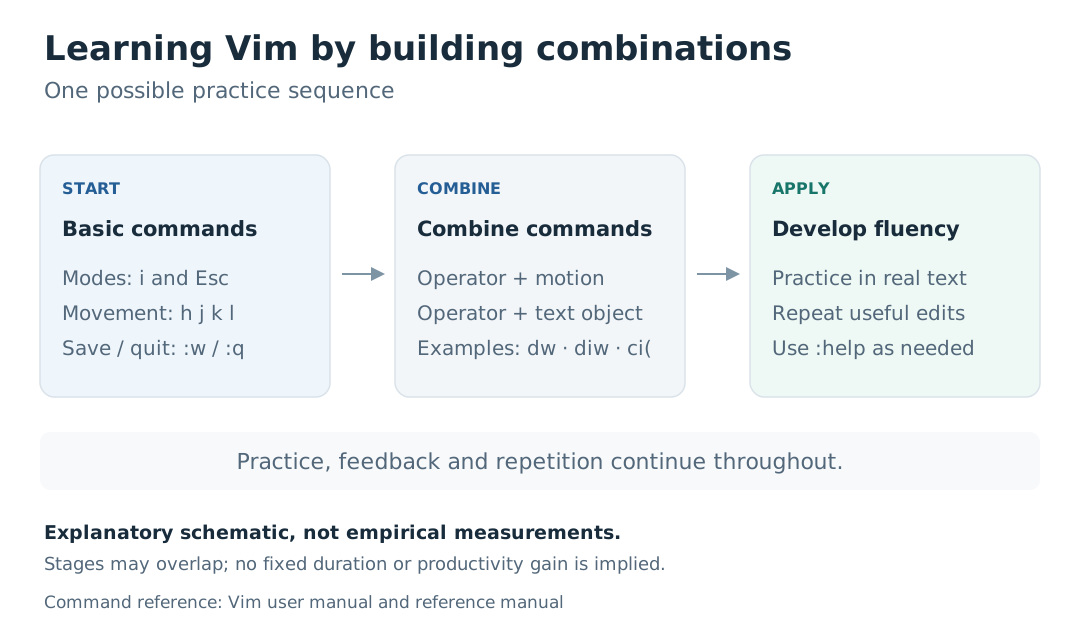
I start with what makes me able to type, save, and exit: i, Esc, :w to save, and :q to exit when there are no unsaved changes. Then I add word movements, and then modification commands that recur in my work. You can reference :help within the editor, or try the vimtutor tutorial if it was installed with Vim. 8I pick a small skill, like changing what’s inside the parentheses, and use it until it becomes familiar. Then I add something else. I don’t have to stop doing my work until I have memorized the entire reference.
Who made it?
Vim started with Bram Moolenaar. He loved that his story also linked the idea of helping children in Uganda, an idea known in his community as charityware. Bram died on August 3, 2023, his family announced, and the project and its community continue. 9
The official support page still mentions Helping Children in Uganda, and currently directs support to Kuwasha. So, if you want to read the story or contribute, it’s best to go back to the current project page. 10
I like this human aspect: a small tool that goes into the details of many people’s days, with a name, an experience, and a community behind it.
How did it factor into the way I work?
I don’t learn every tool by stopping my life and dedicating it to it.
I’m trying to open a small path for her within the work that already exists. I try it in a file, or part of an assignment, and give it a limited amount of time to learn. If it proves useful, its area gradually increases.
Sometimes I can’t pinpoint when it has become a normal part of my day. Did I introduce it into my way of working, or did the way of working itself expand and contain it? I don’t know, but I know the practical sign: I open another program, then hope Vim motions are there.
This does not make Vim the beginning and the end, nor does it make its user better than others. For me it is a tool that reduces some of the movements that interrupt thinking. I keep what is useful to me, and leave what I don’t need.
Just as a pianist learns key positions and finger movements to direct his attention to the melody, I want the writing and editing movements to become familiar, leaving me more room to think about what I’m writing.
Sources and further reading
- Vim Reference Manual — Introduction. The editor and various modes.
- Vim User Manual — Making small changes. Composition of commands, motions, text objects, and repeat modification.
- Vim Reference Manual — Cursor motions. Motion, words, arcs, and text objects.
- Sublime Text — Vintage Mode. Support vi style inside Sublime.
- VSCodeVim. Addition and documentation of differences and settings.
- Neovim — Vision. Its relationship to Vim and project goals.
- LazyVim — Getting Started. Setup definition and requirements.
- Vim User Manual. Learn, Help, and Vim tutor, Getting Started, Save and Exit.
- Message from the family of Bram Moolenaar. Family announcement, August 5, 2023.
- Vim — Sponsor Vim Development. Current support and assistance page for children in Uganda. 11. mattmc3 — Neovim/Vim graphical cheat sheet. Keyboard map source and license.
Sources last revised: November 3, 2026.